Complete guide to iPad battery replacement in Malaysia for 2026. Pricing for iPad Air, Pro, mini, and standard models. Learn when to replace vs repair, battery degradation signs, battery health check methods, and data safety during replacement.
iPad Battery Replacement Malaysia 2026: Complete Guide
Is your iPad shutting down unexpectedly or barely lasting through the day? Battery degradation is common in iPads after 2-3 years of use. This comprehensive guide covers everything about iPad battery replacement in Malaysia - costs, timeline, what to expect, and how to maximize your new battery's lifespan.
iPad Models and Battery Replacement Costs
iPad Standard Models (2019-2024):
| iPad Model | Battery Capacity | Replacement Cost | Turnaround |
|---|---|---|---|
| iPad 10th Gen (2022) | 28.6Wh | RM 299 | 3-4 hours |
| iPad 9th Gen (2021) | 32.4Wh | RM 279 | 3-4 hours |
| iPad 8th Gen (2020) | 32.4Wh | RM 259 | 2-3 hours |
| iPad 7th Gen (2019) | 32.4Wh | RM 249 | 2-3 hours |
iPad Air Models (2019-2024):
| iPad Air Model | Battery Capacity | Replacement Cost | Turnaround |
|---|---|---|---|
| iPad Air 6 M2 (2024) | 28.9Wh | RM 369 | 4-5 hours |
| iPad Air 5 M1 (2022) | 28.6Wh | RM 349 | 3-4 hours |
| iPad Air 4 (2020) | 28.6Wh | RM 329 | 3-4 hours |
| iPad Air 3 (2019) | 30.2Wh | RM 299 | 2-3 hours |
iPad Pro Models (2018-2024):
| iPad Pro Model | Battery Capacity | Replacement Cost | Turnaround |
|---|---|---|---|
| iPad Pro 13" M4 (2024) | 50.2Wh | RM 549 | 5-6 hours |
| iPad Pro 11" M4 (2024) | 31.3Wh | RM 429 | 4-5 hours |
| iPad Pro 12.9" M2 (2022) | 40.9Wh | RM 499 | 5-6 hours |
| iPad Pro 11" M2 (2022) | 28.7Wh | RM 399 | 4-5 hours |
| iPad Pro 12.9" M1 (2021) | 40.9Wh | RM 479 | 4-5 hours |
| iPad Pro 11" M1 (2021) | 28.7Wh | RM 379 | 3-4 hours |
| iPad Pro 12.9" (2020) | 36.7Wh | RM 449 | 4-5 hours |
| iPad Pro 11" (2020) | 28.4Wh | RM 359 | 3-4 hours |
| iPad Pro 12.9" (2018) | 36.7Wh | RM 429 | 4-5 hours |
| iPad Pro 11" (2018) | 29.4Wh | RM 339 | 3-4 hours |
iPad mini Models (2019-2024):
| iPad mini Model | Battery Capacity | Replacement Cost | Turnaround |
|---|---|---|---|
| iPad mini 6 (2021) | 19.3Wh | RM 349 | 3-4 hours |
| iPad mini 5 (2019) | 19.1Wh | RM 299 | 2-3 hours |
Prices at Techfix Malaysia as of February 2026. Same-day service available for most models.
When to Replace vs Repair Your iPad
Replace Battery When:
✅ Performance Issues:
- iPad lasts less than 4 hours with normal use
- Shuts down at 20-40% battery
- Runs slower than usual (performance throttling)
- Takes 5+ hours to charge fully
✅ Physical Warning Signs:
- Screen slightly lifted from frame
- Back panel separated at edges
- Device feels thicker than normal
- ⚠️ URGENT: Battery swelling - stop using immediately
✅ System Warnings:
- "Battery Service Required" message
- Battery health indicator missing
- Charging icon shows but percentage doesn't increase
✅ Age Factors:
- iPad is 2-4 years old
- Still meets your performance needs
- Replacement cost is reasonable vs new iPad
Consider New iPad Instead When:
❌ Financial Factors:
- iPad is 5+ years old
- Repair costs exceed 50% of new iPad price
- Multiple components failing (screen + battery + buttons)
❌ Performance Needs:
- Apps you need require newer iOS
- iPad too slow even with new battery
- Want newer features (Face ID, M-chip performance, 120Hz ProMotion)
❌ Trade-in Value:
- Working iPad has good trade-in value
- New iPad on promotion/discount
- Can sell current iPad for parts
Cost Comparison Example (iPad Air 5 M1):
- Battery replacement: RM 349
- Refurbished iPad Air 5: RM 2,299
- New iPad Air 6 M2: RM 2,699
If iPad works perfectly except battery, replacement extends life 2-3 years for 15% of new device cost.
Signs of Battery Degradation in iPads
Early Warning Signs (80-90% Health):
-
Slightly Reduced Usage Time
- Used to last full workday, now needs mid-day charge
- Video playback reduced from 10 hours to 7-8 hours
- Gaming session time noticeably shorter
-
Longer Charging Times
- Takes 4-5 hours instead of 3 hours
- Stuck at certain percentages (like 80%)
- Fast charging not as fast as before
-
Inconsistent Battery Percentage
- Jumps from 45% to 30% suddenly
- Increases while not charging
- Shows different percentage after reboot
Moderate Degradation (70-80% Health):
-
Significant Performance Impact
- Apps launch slower
- Video editing/photo editing lags
- Games run at lower frame rates
- iPad feels warm during light use
-
Charging Behavior Changes
- Won't charge past 95%
- Drops rapidly from 100% to 80%
- Needs multiple charge cycles per day
-
Temperature Issues
- Gets hot during charging
- Warm even in standby mode
- "iPad needs to cool down" messages
Critical Degradation (Below 70% Health):
-
Severe Usage Limitations
- Only 2-3 hours of active use
- Can't watch one full movie
- Dies during video calls
- Needs power bank constantly
-
Reliability Issues
- Unexpected shutdowns at 30-50%
- Won't boot without charger connected
- Turns off when unplugging charger
- Random reboots
-
Physical Changes
- Screen lifting (battery swelling)
- Back panel bulging
- Trackpad uneven (iPad Magic Keyboard)
- ⚠️ Fire hazard - bring for repair IMMEDIATELY
How to Check iPad Battery Health
Unlike iPhones, iPads don't have built-in battery health settings. Here's how to check:
Method 1: Third-Party Apps (Most Accurate)
Recommended App: coconutBattery (Mac required)
- Download coconutBattery for Mac (free)
- Connect iPad to Mac via USB cable
- Open coconutBattery
- Select your iPad from device list
- View:
- Current maximum capacity percentage
- Cycle count (charges from 0% to 100%)
- Design capacity vs current capacity
- Battery temperature
Interpretation:
- 100-90%: Excellent condition
- 89-80%: Good (monitor quarterly)
- 79-70%: Fair (consider replacement soon)
- Below 70%: Poor (replace recommended)
Cycle Count Guidelines:
- 0-300 cycles: Like new
- 300-500 cycles: Normal wear
- 500-800 cycles: Moderate degradation expected
- 800+ cycles: Significant wear, likely needs replacement
Method 2: Analytics Data (Built-in, Complex)
- Open Settings > Privacy & Security > Analytics & Improvements
- Tap "Analytics Data"
- Scroll to find "Analytics-YYYY-MM-DD" files
- Look for "BatteryCycleCount" and "BatteryHealth"
- Note: Difficult to interpret without technical knowledge
Method 3: Free Diagnostic at Techfix Malaysia
- Bring iPad to either Techfix location
- We'll run comprehensive battery diagnostic (free)
- Receive detailed report:
- Exact battery health percentage
- Cycle count
- Charge/discharge rate
- Estimated remaining lifespan
- Replacement recommendation
- No obligation to repair
Method 4: Observation Testing
- Fully charge iPad to 100%
- Use iPad normally for activities you typically do
- Time how long until 20% (don't let it die completely)
- Compare to Apple's claimed battery life for your model
Expected Battery Life (New iPad):
- Standard iPad: 10 hours web browsing
- iPad Air: 10 hours web browsing
- iPad Pro: 10 hours web browsing, 9 hours cellular
- iPad mini: 10 hours web browsing
If you're getting less than 60% of claimed battery life, replacement recommended.
Data Safety During Battery Replacement
Your Data is Safe - Here's Why:
iPad battery replacement doesn't involve storage:
- Battery is separate component
- No connection to flash storage chips
- Technicians don't access your data
- No software modifications needed
However, Backup is STILL Recommended:
Why backup before any repair:
- Accidents can happen (rare but possible)
- Power surge during repair could affect logic board
- If additional issues found, may need more extensive repair
- Peace of mind
How to Backup iPad Before Repair:
Option 1: iCloud Backup (Easiest)
- Connect to WiFi
- Settings > [Your Name] > iCloud > iCloud Backup
- Tap "Back Up Now"
- Wait for completion (can take 30 min - 2 hours)
- Verify: Check "Last Backup" time
What's Backed Up:
- Photos and videos
- Device settings
- App data
- Messages
- Ringtones
What's NOT Backed Up:
- Content from iTunes/App Store (re-download)
- Touch ID/Face ID settings (reset after restore)
- Apple Pay information
Option 2: iTunes/Finder Backup (Most Complete)
For Mac (macOS Catalina or later):
- Connect iPad to Mac with cable
- Open Finder
- Select your iPad in sidebar
- Click "Back Up Now" under "Backups"
- Check "Encrypt local backup" for passwords/health data
- Wait for completion
For Windows PC:
- Install latest iTunes
- Connect iPad to PC
- Click iPad icon in iTunes
- Select "This Computer" under Backups
- Check "Encrypt iPad backup"
- Click "Back Up Now"
Advantages:
- Faster than iCloud
- More complete (includes passwords)
- Doesn't require iCloud storage
- Can be restored without internet
At Techfix, We Take Extra Precautions:
- Device stored in locked cabinet overnight (if not same-day)
- Only assigned technician handles your iPad
- CCTV coverage of repair areas
- No attempts to unlock device
- Password only requested if needed for testing (you can observe)
Extended Warranty Options
Techfix Malaysia Standard Warranty:
- Duration: 90 days parts and labor
- Coverage: Battery defects, capacity below 80% after replacement
- Process: Free replacement if battery fails within 90 days
- Conditions: Excludes physical damage, liquid damage, third-party modifications
Apple Warranty Consideration:
Apple Limited Warranty (1 Year):
- Free battery replacement if below 80% capacity
- iPad must be within 1-year warranty period
- No accidental damage coverage
- Appointment required, 5-7 days turnaround
AppleCare+ for iPad:
- Covers battery below 80% for 2 years
- Accidental damage coverage (2 incidents)
- RM 299 for standard iPad, RM 549 for iPad Pro
- Worth it only if purchasing new iPad
When to Use Apple vs Techfix:
Choose Apple Service If:
- iPad under 1-year warranty AND battery below 80%
- You have AppleCare+ coverage
- Don't mind 5-7 day wait
Choose Techfix If:
- Out of warranty (save 40-50% vs Apple pricing)
- Need same-day service (most models)
- Want transparent upfront pricing
- Prefer local service (walk-in or appointment)
Cost Comparison (iPad Pro 11" M2):
- Apple Authorized: RM 699 (7-day wait)
- Techfix Malaysia: RM 399 (same-day service)
- Savings: RM 300 (43% less)
iPad Battery Replacement Process at Techfix
Step 1: Free Diagnostic (15-30 minutes)
What we check:
- Current battery health and cycle count
- Charge/discharge rate
- Physical condition (swelling, damage)
- Screen condition (ensure no cracks before opening)
- Button functionality
- Camera and speaker test
You receive:
- Detailed diagnostic report
- Transparent written quote
- Explanation of issues found
- Options (OEM vs Genuine parts if applicable)
Step 2: Approval and Timeline
Once you approve:
- Same-day service if parts in stock (drop off before 2pm)
- Next-day if special order needed
- WhatsApp updates every step
- Can wait in comfortable area or leave iPad
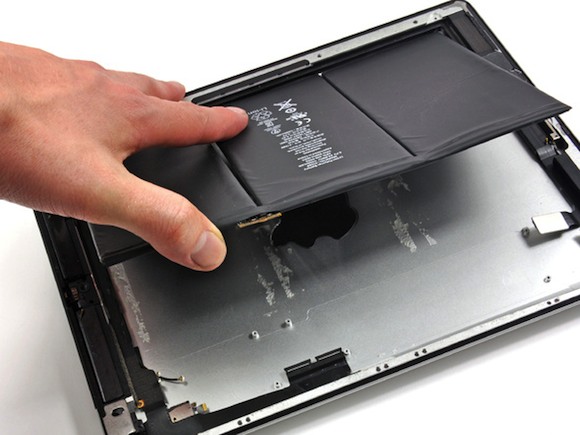
Step 3: Professional Replacement (2-6 hours)
Our process:
- Preparation: Ground straps, clean workspace, specialized tools
- Opening: Careful heating to soften adhesive
- Disconnection: Battery connector, display connectors
- Removal: Extract old battery safely (no punctures)
- Cleaning: Remove old adhesive, clean contacts
- Installation: New battery with proper adhesive
- Testing: Full charge cycle, capacity test, functionality check
- Sealing: Restore water resistance where applicable
Step 4: Quality Control Testing
Before returning to you:
- Full charge to 100%
- Discharge test to 20%
- Charging speed verification
- Temperature monitoring
- Screen responsiveness check
- Camera, speakers, buttons test
- Final cleaning and inspection
Step 5: Pickup and Warranty Explanation
You receive:
- Fully tested iPad
- Detailed invoice with warranty terms
- Care instructions for new battery
- 90-day warranty certificate
- Return booking discount voucher (10% off next service)
Maximizing New Battery Lifespan
Once you've invested in battery replacement, maximize its life:
Charging Best Practices:
-
Avoid Extreme Charge Levels
- Try to keep between 20-80%
- Occasional 100% charge is OK (monthly calibration)
- Don't let it reach 0% frequently
-
Use Original or Certified Chargers
- Apple 20W USB-C charger (or equivalent)
- Avoid cheap generic chargers (inconsistent power delivery)
- Certified MFi cables only
-
Optimize Charge Timing
- Don't leave plugged in overnight at 100%
- Charge during day when you can monitor
- Remove from charger when full
-
Temperature During Charging
- Remove thick cases during charging
- Charge in cool environment (air-conditioned room)
- Don't use intensive apps while charging
Software Optimization:
-
Display Settings
- Enable Auto-Brightness
- Reduce screen brightness manually
- Lower screen timeout to 2-3 minutes
- Use dark wallpapers (OLED iPads)
-
Background Activity
- Settings > General > Background App Refresh > OFF (or WiFi only)
- Disable push email, use Fetch instead
- Limit location services to "While Using"
- Turn off automatic downloads
-
Feature Management
- Disable AirDrop when not needed
- Turn off Bluetooth if not using accessories
- Airplane mode in low/no signal areas (saves battery)
- Enable Low Power Mode at 20%
-
Regular Updates
- Update to latest iPadOS (battery optimizations)
- Update apps (efficiency improvements)
- Restart iPad weekly
Environmental Protection:
-
Temperature Management
- Optimal: 16°C to 22°C
- Acceptable: 0°C to 35°C
- Never leave in parked car under Malaysian sun (can reach 70°C)
- Don't use in direct sunlight for extended periods
-
Storage Best Practices
- If not using for weeks: Charge to 50%
- Store in cool, dry place
- Turn off completely (not just sleep mode)
- Check every 3 months, recharge to 50% if needed
Physical Care:
-
Protective Measures
- Use quality case/cover (protects from falls)
- Screen protector prevents cracking during drops
- Keyboard case adds protection
- Avoid pressure on iPad when in bag
-
Cleaning Routine
- Clean charging port monthly (compressed air)
- Wipe screen with microfiber cloth
- Keep away from liquids
- Don't block speaker grilles
Expected Lifespan with Proper Care:
- 800-1000 charge cycles to 80% health
- 3-5 years for typical users
- 2-3 years for power users (heavy daily use)
Frequently Asked Questions
Q: How long does iPad battery replacement take? A: iPad battery replacement at Techfix Malaysia takes 2-6 hours depending on model. Standard iPads and iPad minis: 2-4 hours. iPad Air: 3-4 hours. iPad Pro 11": 3-5 hours. iPad Pro 12.9": 5-6 hours. Same-day service available if dropped off before 2pm.
Q: Will my data be deleted during battery replacement? A: No, battery replacement doesn't affect your data. The battery is a separate component from storage. However, we always recommend backing up to iCloud or computer before any repair service as a safety precaution.
Q: Can I replace iPad battery myself? A: Not recommended. iPad batteries are heavily glued to the chassis and require heat and specialized tools to remove safely. Risk of puncturing battery (fire hazard), cracking screen, or damaging logic board is high. Professional replacement at Techfix costs RM 249-549 and includes warranty.
Q: How do I know if my iPad battery is swelling? A: Signs of battery swelling: (1) Screen lifted from frame, (2) Back panel separated at edges, (3) Device feels thicker, (4) Trackpad uneven (if using Magic Keyboard), (5) Case doesn't fit properly. If you notice any swelling, STOP using iPad immediately and bring for service - swollen batteries can catch fire.
Q: What's the difference between iPad Air and iPad Pro battery replacement cost? A: iPad Air battery replacement: RM 299-369. iPad Pro 11": RM 339-429. iPad Pro 12.9": RM 429-549. Pro models cost more due to larger batteries (up to 50.2Wh vs 28.9Wh) and more complex disassembly process with additional layers and connectors.
Q: Does iPad battery replacement affect Apple Pencil charging? A: No, Apple Pencil charging is not affected by battery replacement. The magnetic charging strip for Apple Pencil 2 is separate from the main battery. After replacement, your Apple Pencil will charge and pair exactly as before.
Book Your iPad Battery Replacement Today
Don't let a dying battery limit your iPad's potential. Get expert battery replacement at Techfix Malaysia with same-day service, quality parts, and 90-day warranty.
Why Choose Techfix for iPad Repair:
- ✅ 8,000+ iPads repaired since 2018
- ✅ Same-day service available (most models)
- ✅ Free battery diagnostics
- ✅ 90-day warranty on all battery replacements
- ✅ Original adhesive maintains water resistance
- ✅ Transparent pricing with written quotes
- ✅ Certified technicians trained in iPad repair
📍 Sunway: G-06-28, Level 6, Block G, Sunway Geo Avenue, Jalan Lagoon Selatan, Sunway, 47500 Subang Jaya, Selangor
📍 Cyberjaya: A-G-06, CoPlace 2, Jalan Usahawan, Cyber 5, 63000 Cyberjaya, Selangor
📞 Call/WhatsApp: 017-355 5725 📧 Email: fix@techfix.my 🌐 Book Online: techfix.my/booking
Same-day service for most iPad models. Walk-ins welcome or book online to skip the queue!